Best design review software for hardware teams (judge it by what it reads)
Most lists of the best design review software are written for designers proofing mockups, which leaves engineers reviewing schematics with little to use. If you run hardware design reviews, judge a tool on four tests. Does it read native ECAD files, check parts against their datasheets, trace decisions to a revision, and fit your stack?
Key takeaways
- The best design review software for hardware reads native ECAD files and diffs schematics, PCB layouts, and BOMs at the object level.
- A design feedback tool annotates images of a design, so it cannot see the nets and part attributes where hardware errors live.
- An AI design review should build its checks from the datasheets of the parts in your design and cite the page behind each finding.
- Evaluate any tool on a finished board of your own with known issues, and expect a plain scope statement, such as schematics only.
Introduction: hardware review has a feedback-tool problem
When we searched for the best design review software in November 2026, the top-ranking pages covered creative proofing, website annotation, and mechanical CAD review. None of them opened a schematic, so electronics teams got answers to a question they did not ask.
Hardware teams already run rigorous reviews, with real checklists and senior engineers walking them. The tooling around those reviews is still screenshots, PDFs, spreadsheets, and email. One engineering lead put it plainly: "Despite holding the design reviews, often with six senior engineers, somehow we seem to miss it."
Each miss surfaces later as rework or a re-spin. Accuris published a design rework cost survey of 439 professionals, run by Fuld & Company in March 2026.
In it, "85% of respondents report facing design rework costs of up to $250K." That $250K is a ceiling, and the respondents span five industries, electronics among them.
Design review software vs design feedback tools
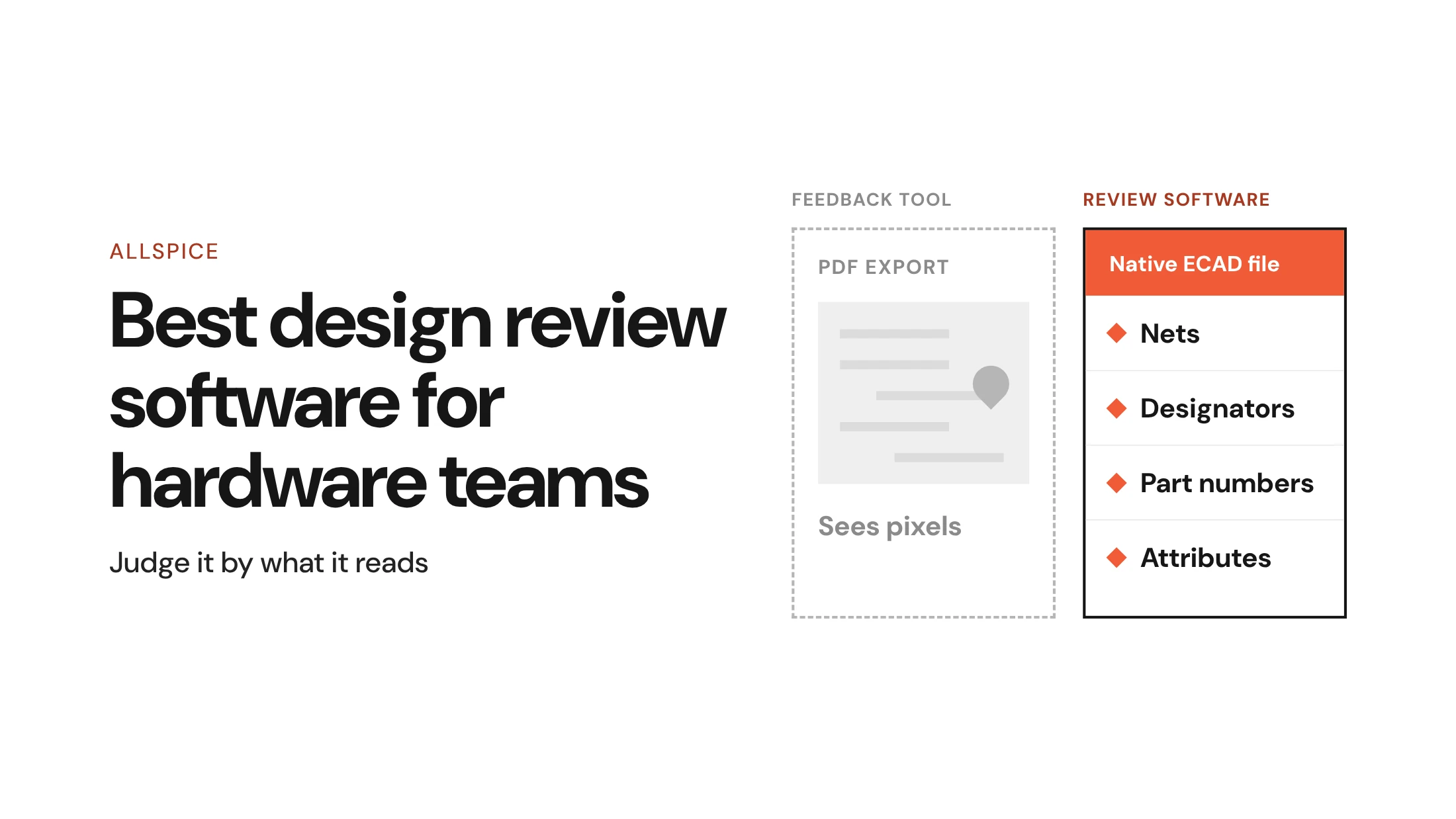
Design review software for hardware works on the design data itself: nets, designators, attributes, and BOM lines. A design feedback tool works on a picture of the design, such as a PDF export, and pins comments to pixels. Both collect comments, but only one can tell you that a net changed between revisions.
Most visual feedback tools were built for creative and web teams, and they do that job well. The gap appears in a hardware design review, where the error usually sits in data a picture cannot carry.
If the errors you worry about live in nets and part values, a design feedback tool cannot reach them.
Four tests for the best design review software
The four tests below follow the order a review actually runs. First the tool has to open the design. Then it has to check the design, record what was decided, and connect to the systems your team already uses.
Each test is a yes-or-no question you can put to any vendor.
1. Does it read your native ECAD files?
Start with the files. If a tool needs a PDF export before review, every comment lands on a copy that drifts from the source after the next edit. The best design review software opens native files from Altium Designer, OrCAD, Cadence, and KiCad directly, with no export step.
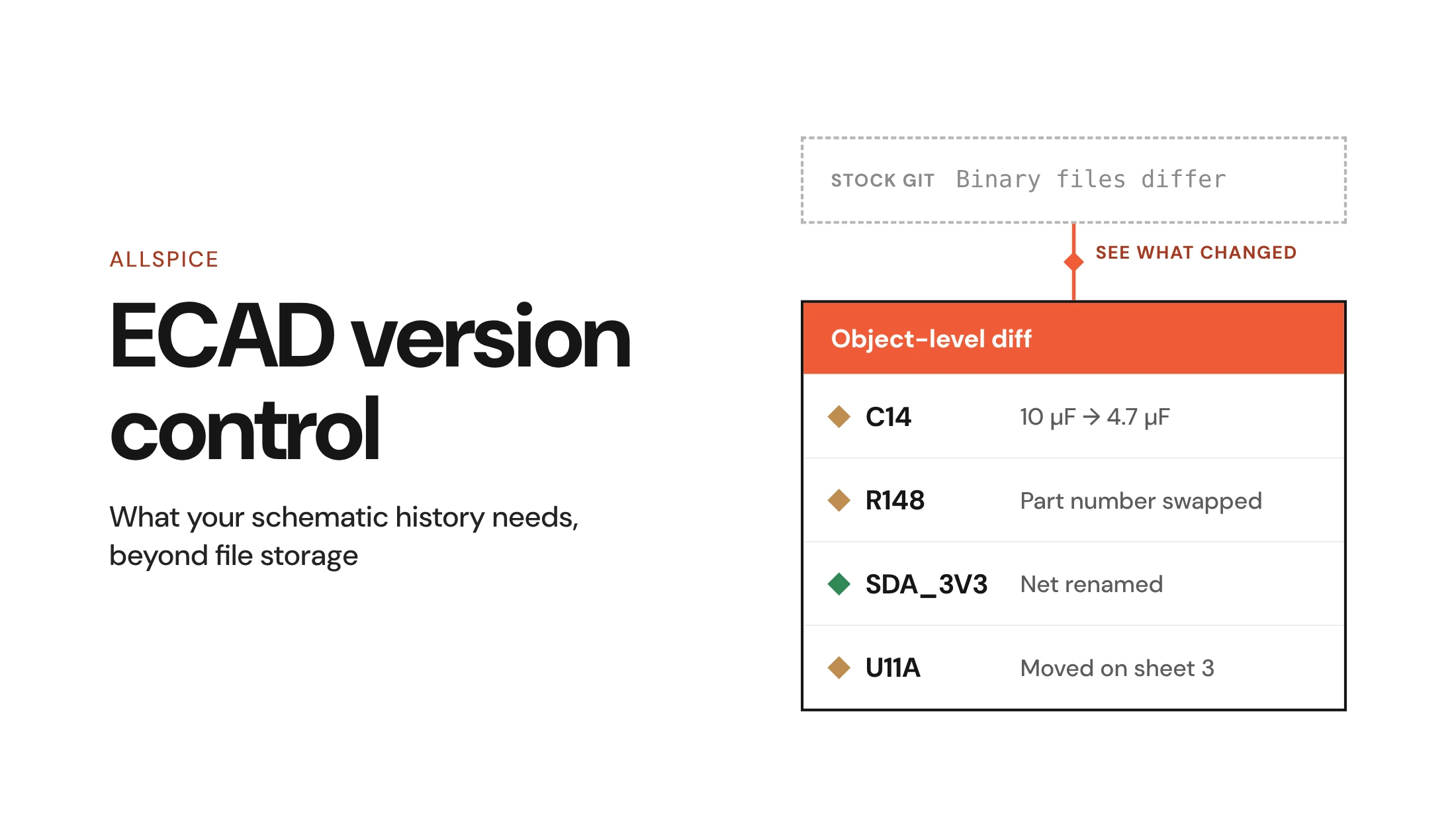
Native files make object-level diffs possible. Allspice compares two revisions of a schematic, PCB layout, or BOM and marks each object: green for new, red for deleted, yellow for changed. Attribute changes count, so a swapped part number on, say, R148 shows up even when the symbol looks identical.
Object-level diffing is common in software, and it was the first thing Allspice built for hardware. It changes what a hardware design review can cover, because reviewers see exactly what moved since the last pass. Nobody has to re-read every sheet to find it.
Comments follow the same logic. In centralized hardware design reviews, a comment attaches to a specific object, such as a pin on U11A, in a specific revision. The thread stays with the part when the next revision lands.
2. Does it check the design against the parts you actually used?
Most review teams run a checklist, and a good one holds years of lessons. Its limit is structural: a fixed list only finds what someone already wrote down. A new regulator with an unusual enable threshold is missing from it until someone adds it, usually after a failure.
AI review is the obvious candidate to fill that gap. Before trusting it, a hardware lead should ask one question: what does the AI check against?
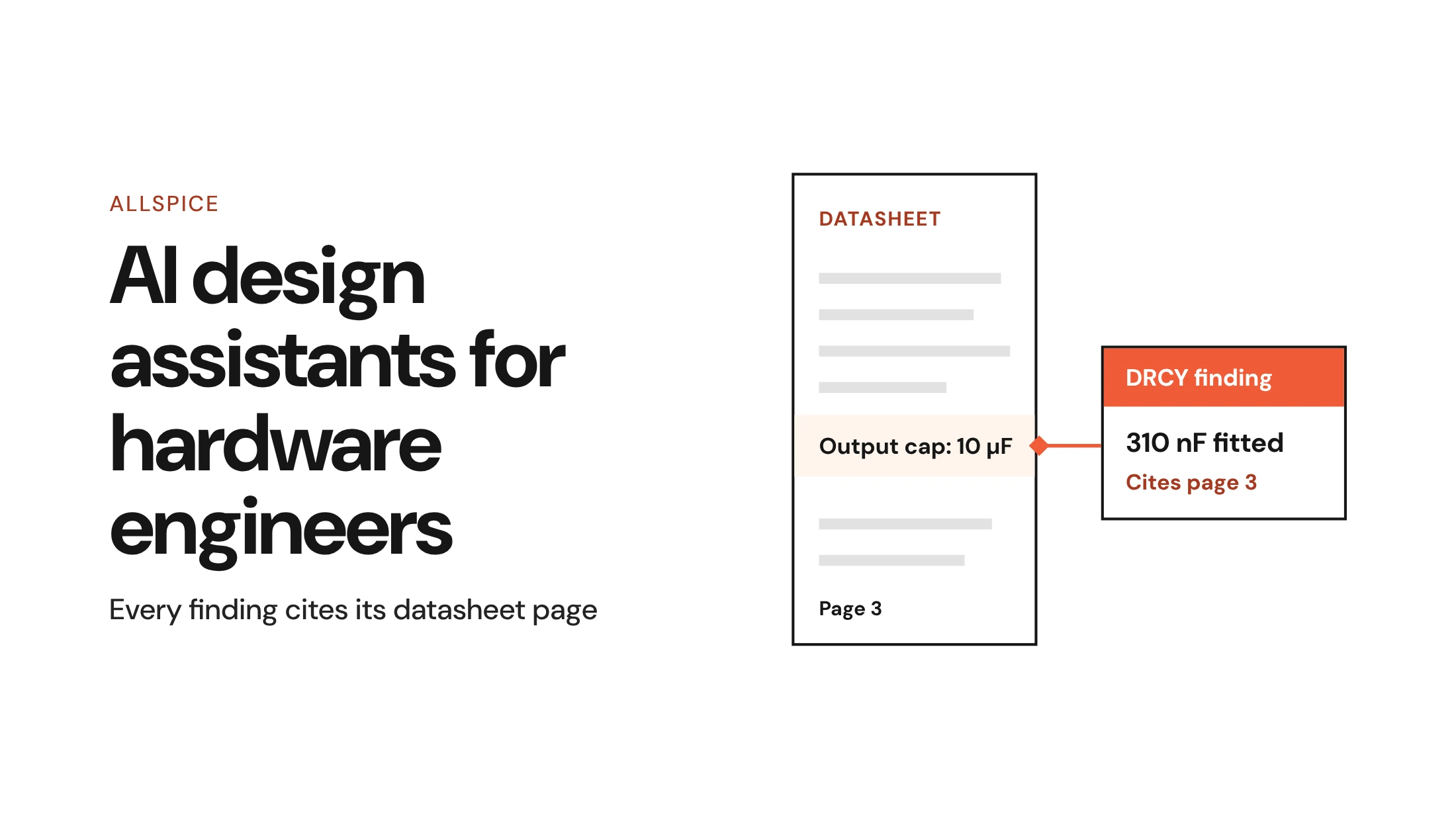
A datasheet-driven first pass answers that question. DRCY AI design review reads the datasheets for the parts in your design and builds the checks from those parts. Each finding cites the datasheet page behind it, so you can inspect the reasoning before you accept it.
Here are findings DRCY has raised on customer designs, with identifying details removed:
- Decoupling of 310 nF on a part whose datasheet, on page 3, calls for 10 µF.
- 6.3 V capacitors on a 5 V rail.
- ESD diodes rated 3.3 V on a level translator running at 4.6 V.
- One net name used for two different nets across sheets, after a connector moved between revisions.
The last finding matters most to reviewers. A page-by-page review cannot catch an error that only exists between two pages, which is why checklists miss errors that lead to re-spins.
A first pass also removes real tedium. The same Accuris-published survey found that "77% of respondents spend five or more hours per week reading datasheets and comparing component alternatives."
Context is the biggest quality lever. A review that knows your spec and your rails can judge each part against what the circuit must do.
Customers have used the phrase "first pass" 76 times, unprompted, in recorded calls with us, and that is the right frame: DRCY shortens the list, and your engineers still sign off.
3. Can you trace every decision back to a revision?
A review is only as good as its record. Six months after release, someone will ask why a capacitor changed dielectric, and the answer should take a minute to find.
That record starts with version history and branching for the design files. On top of that, revision control for hardware in Allspice ties Issues to design objects, cuts Releases from approved revisions, and enforces role-based permissions. It keeps an audit trail across all of it, so a compliance review can follow a decision back to the revision where it was made.
Several customers tell us they value this tracking as highly as the AI. A finding nobody can trace is hard to act on, and a decision nobody recorded tends to get made twice.
BOM churn raises the stakes. 2025 component obsolescence data from Z2Data shows "In 2025, over 620,000 electronic parts were discontinued by manufacturers." Each discontinued part can force a substitution, and each substitution is a design change your history has to explain.
4. Does it fit the stack you already run?
Review software that sits apart from your tools becomes one more place to check. The best design review software connects to the Git platforms and project trackers your team already runs.
Allspice runs two ways. Engineers use the browser workspace for Design Reviews and Releases. Platform and IT teams use the REST API and Model Context Protocol (MCP) to embed Allspice in existing systems, including two-way PLM and ERP sync.
Automation handles the repeatable checks. With hardware CI/CD Automations, deterministic checks such as BOM validation run automatically, so a review starts with the basics already confirmed. Deployment options are simple to state: self-hosted, your own models, your own tokens.
How to evaluate design review software on your own board
Vendor demos use boards chosen to look good. Your own finished design is a fairer test, because you already know where its problems are. Run these four steps in order.
1. Pick a finished design with known issues
Choose a board your team knows well, ideally one that has been through bring-up and an ECO or two. List the errors you already found, or seed a few known ones into a copy. Then run the tool and count how many of them it returns.
This gives you a baseline that a demo cannot. You learn what the tool catches on your parts and your sheet structure. Note anything it finds that your team missed, since those findings are worth checking first.
For a fuller method, see how teams evaluate DRCY.
2. Give the review context
An AI design review without context judges every part against generic limits. Upload the spec, state the power rails, describe each block's intent, and flag parts that will not be fitted. An ESD diode rated 3.3 V only looks wrong if the review knows the line runs at 4.6 V.
Mark do-not-place (DNP) parts in component attributes rather than with color. A color code is invisible to software, while an attribute travels with the part into the review.
3. Triage the findings, then count signal against noise
Read the audit summary before any finding. Missing active-component datasheets can make a review incomplete, so check coverage first.
Then check each finding in this order:
- The location of the finding in the design.
- The claim it makes.
- The reasoning behind the claim.
- The datasheet evidence it cites.
Read the evidence before you judge the verdict. When the observation is valid but the conclusion is wrong, reply to DRCY and explain why. Use thumbs down only when a finding is wrong about the design.
For a large set of findings, triage in three passes: by evidence, then by circuit, then by consequence. Afterward, tally the findings that led to a design change against the ones you dismissed. No tool reaches zero false positives, so judge the ratio on your own board.
4. Check scope honestly
Every tool has limits, and a vendor should state them plainly. Ask what the tool does not review before you count what it does.
For DRCY, the answer is direct. DRCY reviews schematics. It does not review layout, so trace widths, clearances, impedance, thermal relief, and DFM stay with your layout checks and reviewers.
Footprint validation is in progress and has not shipped. Allspice still diffs layouts for human review, and the AI first pass covers schematics. For a fuller breakdown, read what AI review catches.
The best design review software reads the design data itself
The opening problem was a search result full of tools that comment on pictures. Hardware errors live in nets and part values, often in the gaps between sheets, so the software has to read that data. Use the four tests, then prove the answer on a board you already know.
An AI first pass changes where senior reviewers start. Instead of reading every datasheet by hand, they start from a shorter list of cited findings and spend their time on system-level judgment. They still decide what ships, and they still sign off.
Expect this category to keep moving. Footprint checks and deeper design context will widen what a first pass can cover. The tests stay the same: what does the tool read, and can you trace what it found?
FAQs
What is the best design review software for schematics and PCB layouts?
The best design review software for hardware opens native ECAD files, diffs objects between revisions, and ties every comment to the design record. Look for a datasheet-driven AI first pass too, and test any option on one of your own finished boards.
Can a design feedback tool work for hardware design reviews?
A design feedback tool can collect comments on a PDF or screenshot, but it cannot see nets or part attributes. For a hardware design review, that means it cannot diff changes or check parts against their datasheets.
Does AI design review replace human reviewers?
No, an AI design review is a first pass that shortens the list senior reviewers start from. Engineers still judge each finding and sign off on what ships.