How to release an approved BOM to manufacturing without handoff errors
Handing an approved BOM to manufacturing is where good designs still go wrong: a BOM exported from the wrong commit or a part swapped without an ECO can cost a board spin. This guide is for hardware engineering managers, PCB design leads and NPI engineers who need a repeatable release process. It walks through the release workflow, where errors enter, and a checklist for your next board.
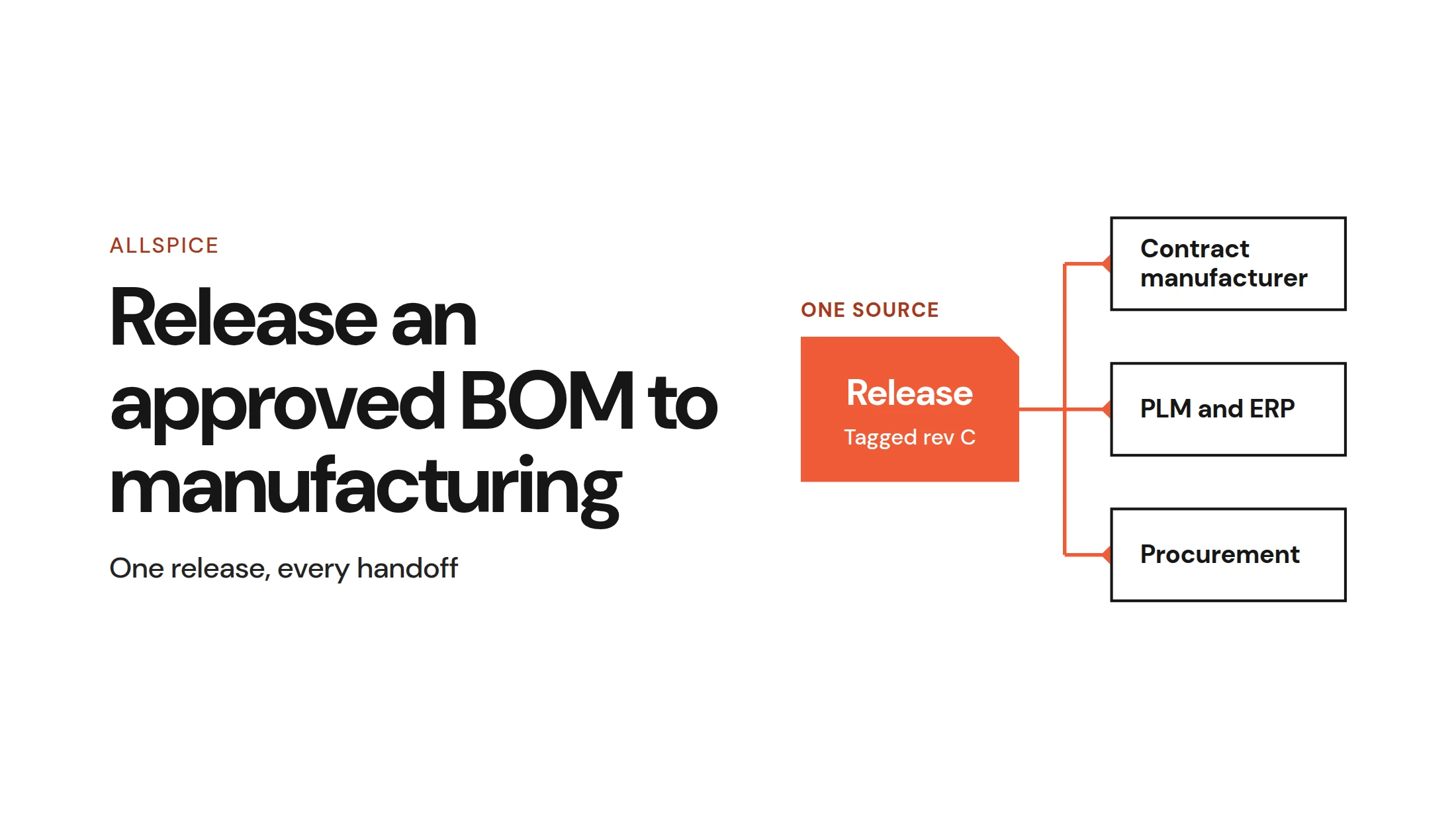
To release an approved BOM to manufacturing, you send one BOM, generated from one frozen design revision, with its fab and assembly outputs. That single release goes to the contract manufacturer, procurement, PLM and ERP, and every downstream copy traces back to it.
Most handoff errors come from breaking that rule, such as a BOM exported from the wrong commit or a part swapped without an ECO. This guide covers the release workflow, where errors enter and a checklist for your next board.
Key takeaways
- Treat the release as the one event that triggers every downstream push.
- Generate the BOM from the tagged revision with a script, so the same source always produces the same file.
- Block the release when automated BOM checks fail, and diff each BOM against the previous release.
- Route every post-release change through an ECO that creates a new revision and a new release.
What happens between design approval and production handoff
After design approval, teams freeze the approved revision and generate the BOM from it. They check and diff that BOM, then push it with fab and assembly outputs as one release to PLM and the contract manufacturer. In Allspice, an ECAD-agnostic revision control system for hardware, that Release points to the approved design review and is shared as one link.
The release boundary matters because it is the one event that should trigger a downstream push. Our ECAD PLM integration guide explains why change should stay out of PLM until that point.
It helps to separate two layers of change. A design change is a new schematic or layout revision, and it stays with the ECAD source until approval. A product change is what PLM tracks after release, and keeping the layers apart stops half-finished edits from leaking into the item master.
The release also marks the line between two BOMs. Engineering releases the engineering BOM (EBOM), the parts list as designed. Manufacturing then restructures it into the manufacturing BOM (MBOM) in PLM or ERP, adding process items and assembly levels.
Every MBOM edit inherits whatever errors the EBOM carried, so the EBOM must be right at release. Errors also get more expensive the longer they survive. In a NASA error cost study of aerospace programs, fixing a requirements error at manufacturing/build cost about 7–16 times the requirements-phase cost.
That NASA data comes from aerospace programs with limited samples, and it is more than 15 years old. Read it as directional for PCB work, since no comparable PCB-specific figure from a qualifying source exists that we could find.
What causes BOM errors at handoff
The BOM errors that hurt at bring-up usually enter at the boundary between design and manufacturing, after the design itself is right. One customer told us they never want their team at an overseas factory for first bring-up, with the PCB good, fighting BOM issues. The table maps where each error enters and the control that stops it.
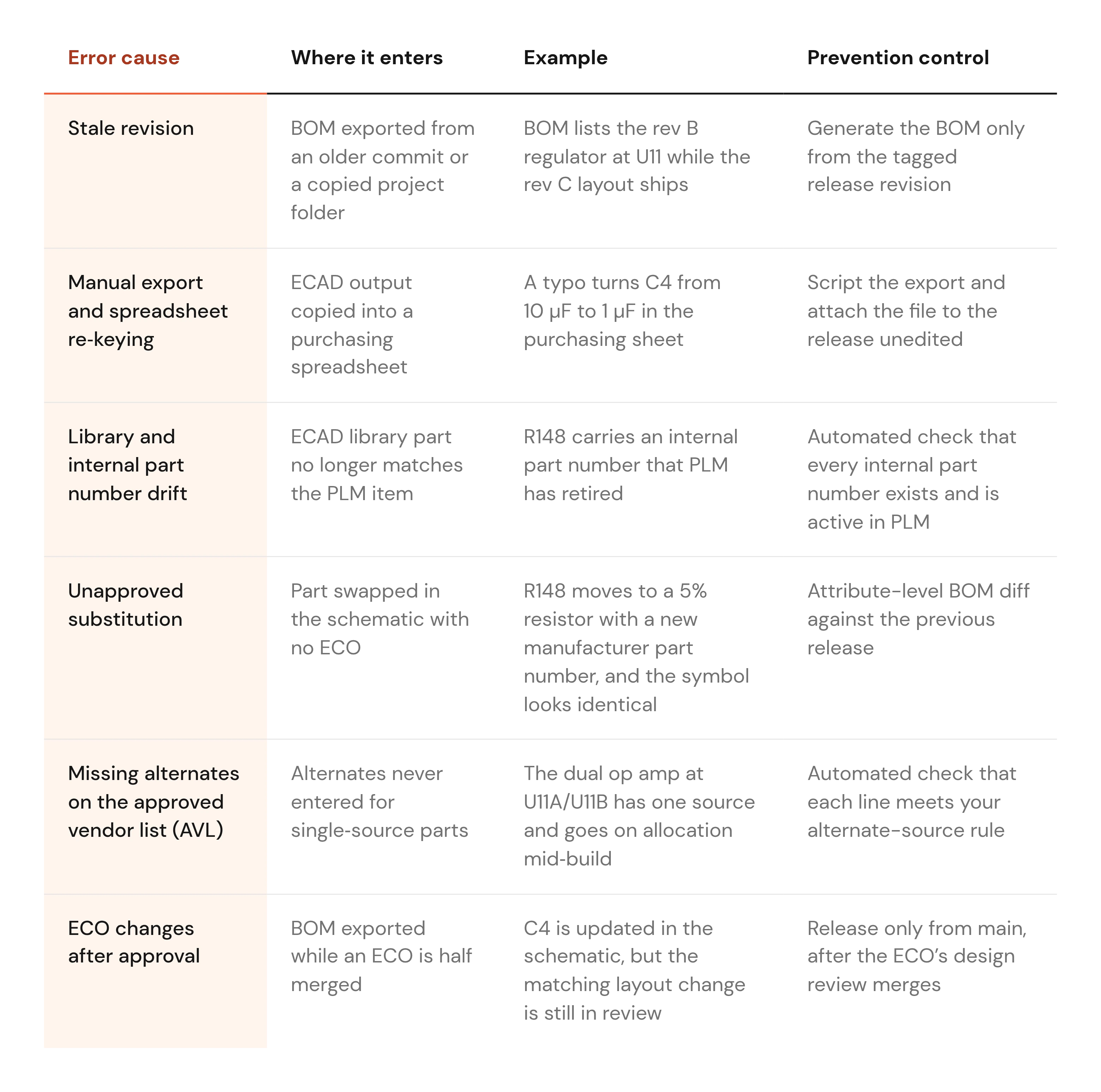
So what causes BOM errors at handoff? Stale revisions, re-keyed spreadsheets, part number drift, unapproved substitutions, missing alternates and exports taken mid-ECO. Allspice visual BOM diffs expose the hardest one to spot: a swapped part number on a resistor whose symbol looks identical.
Stale revisions usually start with folder-copy versioning, which we cover in our post on versioning in hardware design. In our view, re-spins are still routine, so each one adds a revision that needs its own matching BOM.
In the PCD&F 2025 designer survey, Printed Circuit Design & Fab reported that nearly 60% of respondents produce 1–5 respins a year. The same PCD&F survey found 81% say that count has not increased in the past 12 to 18 months.
Release approved BOM to manufacturing: a seven-step workflow
The workflow below has seven steps, and every one points back to a single tagged revision. If a file in the package cannot be traced to that revision, it does not ship.
The steps assume your design review is approved. They apply the same way whether the project was authored in Altium Designer, Cadence, OrCAD or KiCad.
1. Freeze and tag the approved revision
Merge the approved design review to main and tag that commit. In Allspice, a Release points to a specific commit or design review and carries any number of attached files. The source zip is included automatically.
Allspice cuts releases only from main, which keeps work-in-progress branches out of production. Tags are immutable while the release stays editable, so you can fix release notes or add a missing assembly drawing without moving the revision.
Mark the release as a pre-release when some files are not ready, such as a fab drawing still waiting on stackup sign-off. Our guide to structuring hardware releases covers naming and contents in more detail.
2. Generate the BOM from that tagged revision
Check out the tag and generate the BOM from it, because a working copy may hold edits nobody approved. The same source should produce the same BOM file every time, so any difference between two exports is a real design change.
Leave the generated BOM untouched after generation. If procurement needs a different column order or an extra field, change the generation script and regenerate from the tag.
3. Run automated BOM checks
To reduce re-spins from BOM mistakes, make automated BOM checks a release gate. Allspice Automations run BOM checks on every design revision, and a failure can block the Release.
Start with checks that catch the errors in the table above. Each one runs on every revision:
- Every internal part number exists in PLM and is active.
- No line carries an end-of-life (EOL) or not recommended for new designs (NRND) status.
- No reference designator appears twice, such as two C4 entries after a copy-paste.
- Every line has the compliance attributes your products require.
- Every single-source part has an approved alternate on the AVL.
An Automation can call a parts-data API for lifecycle status and record the result against the design revision. Our walkthrough shows how to automate end-of-life checks against a live parts source.
4. Review the BOM diff against the previous release
Compare the new BOM to the last release that shipped. A diff against the last commit hides every change that landed between releases, which is exactly what the CM needs to see.
Allspice visual diffs show BOM changes at the object level, with new lines in green, deleted lines in red and changed lines in yellow. They also catch attribute-level edits, such as R148 moving to a different manufacturer part number while its symbol looks identical.
Every highlighted change should map to an approved ECO or design review. If one does not, stop the release and find out where it came from.
5. Package the BOM with fabrication and assembly outputs
Contract manufacturers build from fab and assembly files, so the package must be complete for the tagged revision. A typical PCBA package to release an approved BOM to manufacturing contains these files:
- Gerber files for every layer
- NC drill files
- Pick-and-place (XY) file
- Fabrication drawing and spec
- Assembly drawings
- BOM
- Schematic PDF
Keep each generated output tied to the commit that produced it, as described in our generated files best practices. A Gerber set without a traceable source commit is the same risk as a stale BOM.
Some teams also send a single intelligent data set. The IPC-2581 Consortium describes the IPC-2581 data exchange format as the way to exchange data between a board designer and a manufacturing or assembly facility. Confirm which revision your CM supports before you switch.
6. Push the release to PLM, ERP or the contract manufacturer
One release should trigger one push. The ECO in PLM references the release by its tag, so anyone reading the change order can open the exact files behind it.
Split ownership cleanly: design owns structure, and PLM owns status. Allspice syncs bidirectionally with PLM and ERP through its REST API. Lifecycle data, such as a part going obsolete, flows back to the design side.
For the CM, distribute the release link. Everyone pulls the same tagged package, and a corrected assembly drawing lands in the same place.
7. Record approvals
Record who approved the release and the check results attached to that revision. Allspice keeps compliance-ready audit trails with role-based permissions and full version history, so the record sits beside the files it covers.
For US medical devices, FDA's Quality Management System Regulation (QMSR) incorporates ISO 13485:2016. The FDA design transfer requirements say design outputs must be verified as suitable for manufacturing before becoming final production specifications. Design changes must also be reviewed and approved before implementation.
Outside medical devices, the same record answers the first question in any build escape review. Which revision did we ship, and who signed off on it?
How to automate BOM generation from approved schematics across ECAD tools
To automate BOM generation from approved schematics, trigger a script on the release event and attach its output to the Release. Allspice reads native Altium Designer, Cadence, OrCAD and KiCad files with no export step. Allspice Automations then run the scripted generation and checks against the tagged revision.
Write one script or Automation per output, such as one for the BOM and one for the pick-and-place file. Each project then follows the same release path, whichever ECAD tool authored it.
That consistency matters most in organizations running more than one ECAD tool across business units. One customer's server boards carry over 1,000 components, far too many lines to compare by eye on every revision.
Be clear about the limits. Field mapping takes real effort, because each ECAD library names its manufacturer part number and internal part number fields differently.
Allspice runs your generation script and does not produce a BOM file natively without one. Our overview of Allspice Automations for hardware explains how these workflows are set up.
How to control BOM changes after release
Once a BOM is released, change it through an engineering change request (ECR) and an ECO. The approved change produces a new revision and a new release, and the old release stays intact.
Never edit a released BOM in place, even to fix a typo. Diff the new release against the old one so the CM sees which lines moved, such as C4 going from 10 uF to 22 uF.
SAE International says its EIA-649C configuration management standard "defines five CM functions and their underlying principles." Tracing each ECO to a release tag and its design source is how a hardware team applies those principles.
Multi-board products add one more rule: release boards together when an interface changes. If the main board's connector pinout moves, the mating board's release moves with it, as we cover in our guide to projects with multiple PCBAs.
Where an ECAD-agnostic release layer fits alongside ECAD and PLM
Each layer in the stack owns one job. ECAD tools author the design and PLM holds the system of record, with Allspice handling revision control and release in between.
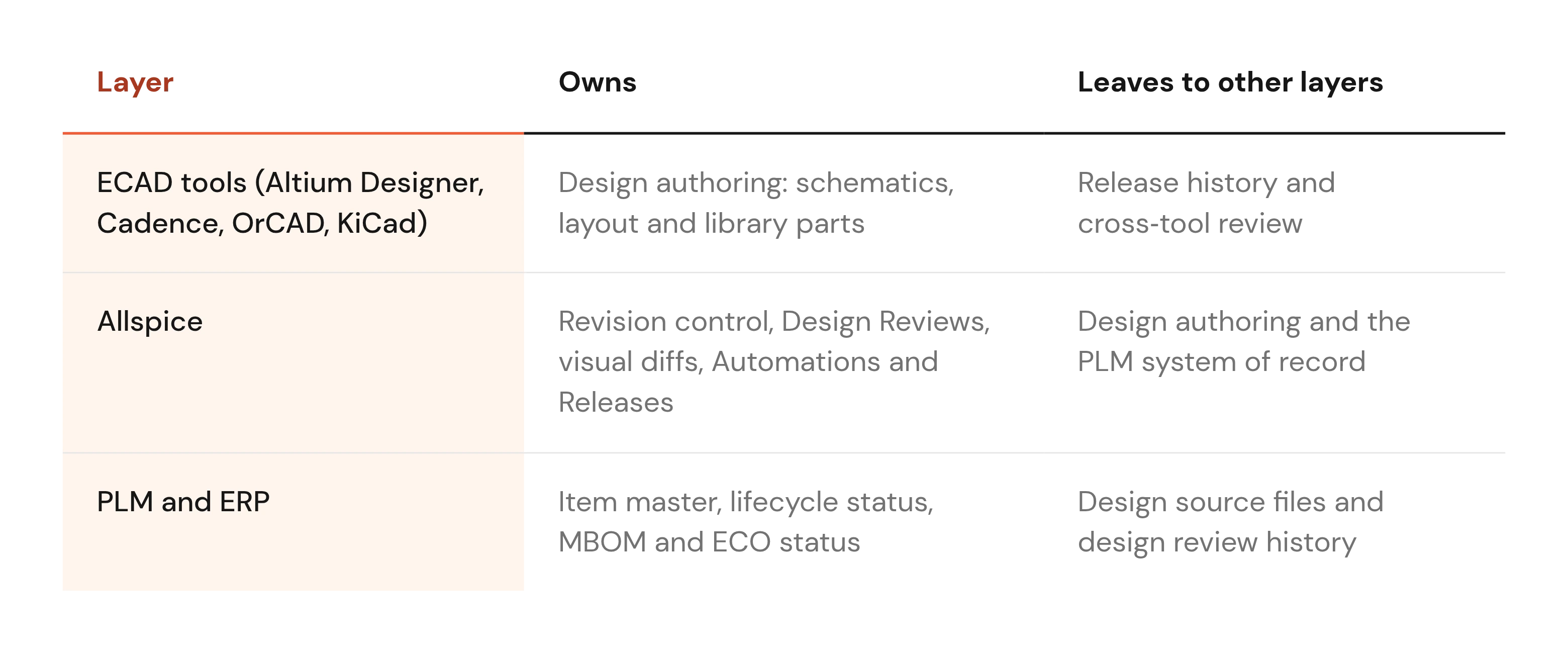
Allspice feeds PLM and does not replace it, so PLM stays the system of record. Teams with strict data rules can run Allspice self-hosted, with their own models and their own tokens.
Allspice serves established hardware and electronics manufacturers, including Meta, AWS, Dell, Cisco, Bose and Molex. Before release, teams can add DRCY, the Allspice AI design review assistant, as a first pass on the schematic. Each finding cites the datasheet page behind it.
That first pass covers schematics only, with no layout or footprint review. The engineer makes the call on every finding. Allspice also does not author designs, so the ECAD tool stays where the board gets drawn.
Release records also feed your quality system. ISO calls the 2026 edition of its ISO 9001 quality management standard "the sixth and current edition." ISO 9001:2026 covers documented information, which a tagged, audited release supports.
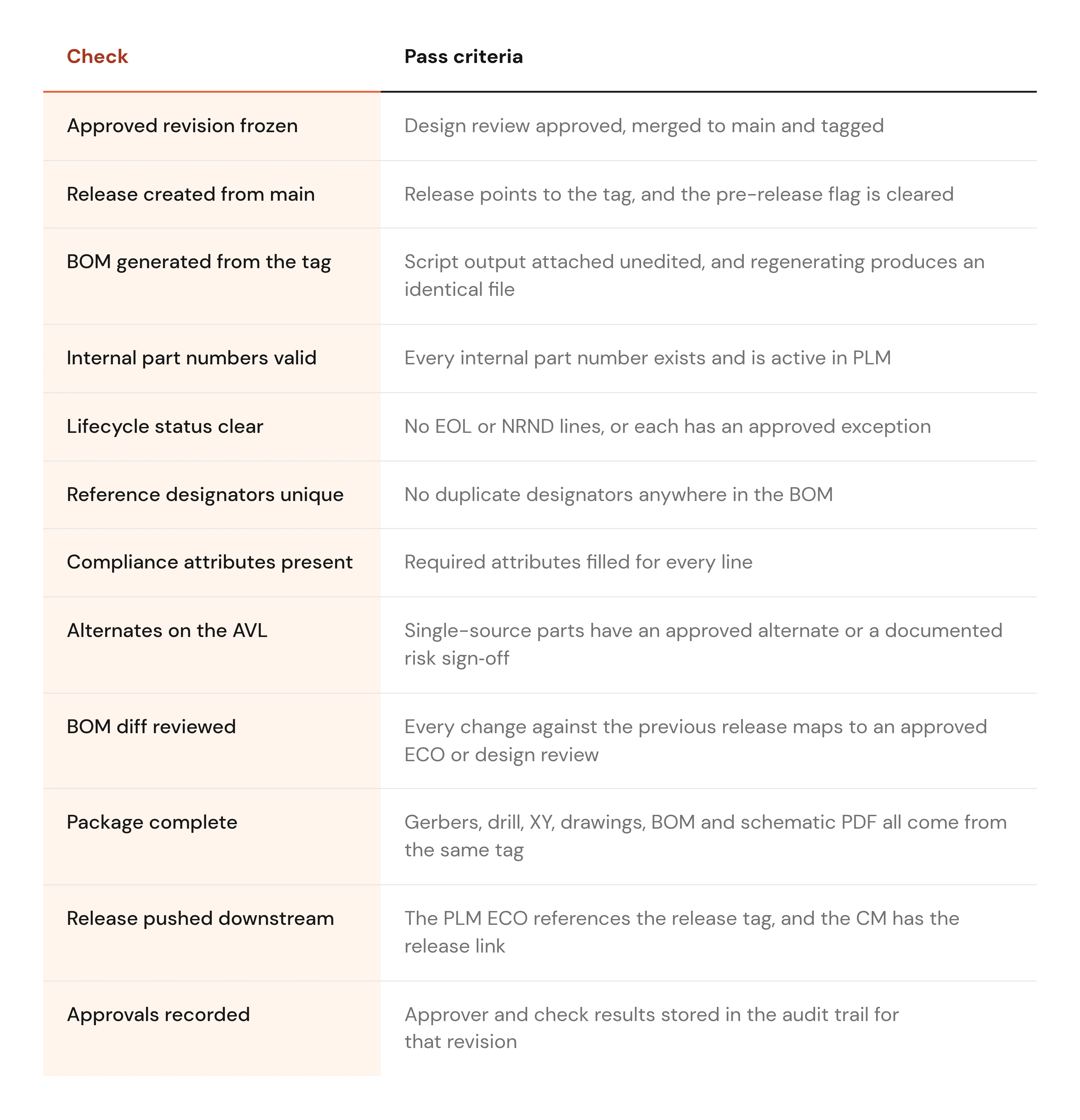
BOM release checklist
Run this checklist at every release. Each row maps to a step above, and the release ships only when every row passes.
FAQs
How do teams push finalized bills of materials to manufacturing after design approval?
Teams generate and check the BOM from the frozen, approved revision, then push one release to PLM and the CM. In Allspice, a Release points to the approved design review with the BOM and fab outputs attached, and syncs to PLM and ERP.
What causes BOM errors between design approval and production handoff?
Most come from the boundary: stale revisions, re-keyed spreadsheets, part number drift, unapproved substitutions, missing alternates and exports taken mid-ECO. Allspice visual BOM diffs catch attribute-level changes, such as a swapped part number on a resistor whose symbol looks identical.
What best practices reduce costly production re-spins from BOM mistakes?
Make automated BOM checks a release gate and diff every BOM against the previous release. Allspice Automations run BOM checks on each design revision, and a failure can block the Release.
How can hardware teams automate BOM generation from approved schematics?
Trigger a generation script on the release event and attach its output to the Release. Allspice reads native Altium Designer, Cadence, OrCAD and KiCad files without an export step, and Automations run the script against the tagged revision.
What is the difference between an EBOM and an MBOM at release?
Engineering releases the EBOM, which lists parts as designed. Manufacturing restructures it into the MBOM in PLM or ERP, adding process items and assembly levels.
Should a released BOM live in PLM or ERP?
We recommend keeping PLM as the system of record for the released BOM, with ERP consuming it for purchasing and production orders. Keep the design source and release history with the design, and let PLM own lifecycle status.